The Laser247 App is an Android-only build delivered as a signed APK from the WhatsApp agent who created your account, not through the Google Play Store. The app runs faster than a mobile browser on live cricket markets, holds an open connection through wickets and boundaries, and adds biometric login and push notifications that the browser version cannot match.
Below: how to download and install safely, what the app actually adds, system requirements, why there’s no iOS version, troubleshooting, and how to lock it down on a shared phone.
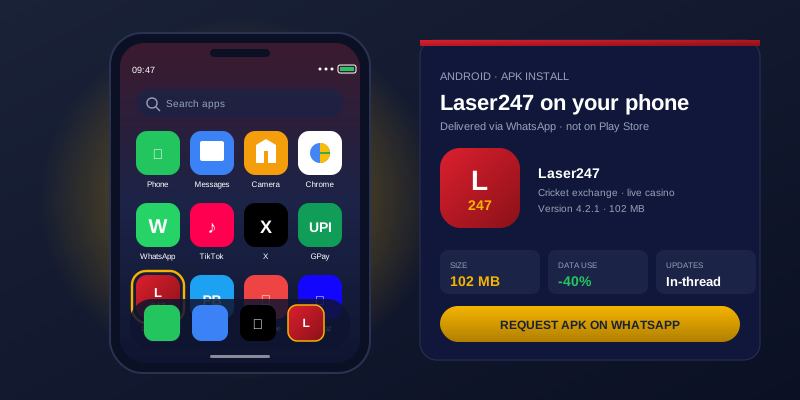
Download the Laser247 APK Safely
The Laser247 App does not exist on Google Play. The Play Store does not list real-money betting apps for the Indian market, so every legitimate Indian betting platform distributes its app the same way — as a signed APK file delivered through an official channel. The right channel for Laser247 is the WhatsApp agent who issued your account credentials.
Start with a real account. The same WhatsApp thread that created your Laser247 ID handles the app download. If you have not opened an account yet, do that first — the app needs valid credentials before it does anything useful.
Request the APK in the chat. A one-line message (“send me the app”) triggers the agent to share the signed APK file as a direct attachment. The file arrives inside WhatsApp, in the conversation you started, never in a separate SMS or email.
Verify the sender before you download. Confirm the message is in the same thread you started from the official Laser247 website, not a fresh chat from a different number. If the file appears in a thread that contacted you first, stop and report it. Real distribution always sits inside the conversation you initiated.
Enable Install from Unknown Sources for the app delivering the file. Android requires explicit permission to install APKs from outside Play, set per-app. The first time you try to install, the OS prompts you to allow installs from whichever app delivered the file — usually WhatsApp itself, or your file manager. Approve it for that one app only, not system-wide.
Tap the APK to install. A standard Android install prompt appears, with the requested permissions listed. The Laser247 App requests internet access, biometric API access, notifications, and storage — nothing that the OS labels as a restricted permission. Approve the install.
The Android security model that powers all of this is documented in detail in the Android Open Source Project security features — the same model that protects the Play Store apps you already use. The APK sideload pathway adds one extra check (the unknown-sources approval) and is otherwise identical to a Play install once the app is on the device.
What the Laser247 App Actually Adds
A mobile browser already does almost everything the app does. The reason to install the app is the small set of things the browser cannot do well.
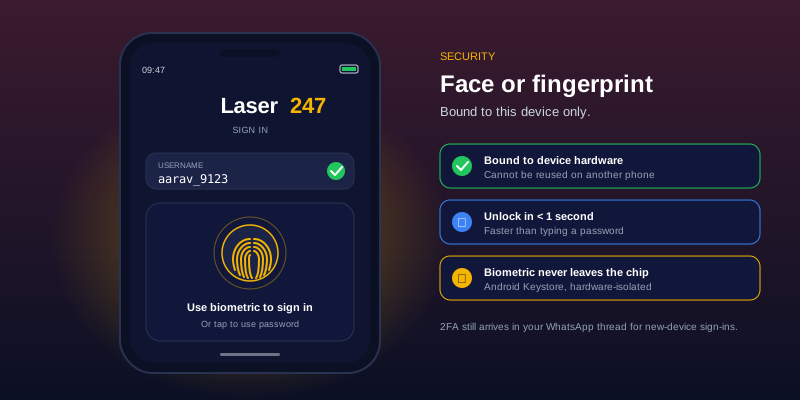
- Biometric login. Face unlock or fingerprint replaces the password on every sign-in. Nothing biometric ever leaves your phone — Android stores the template in a secure hardware enclave that even the app itself cannot read.
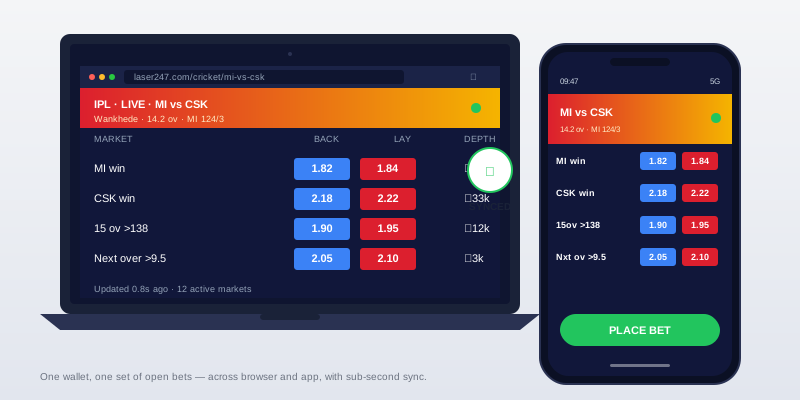
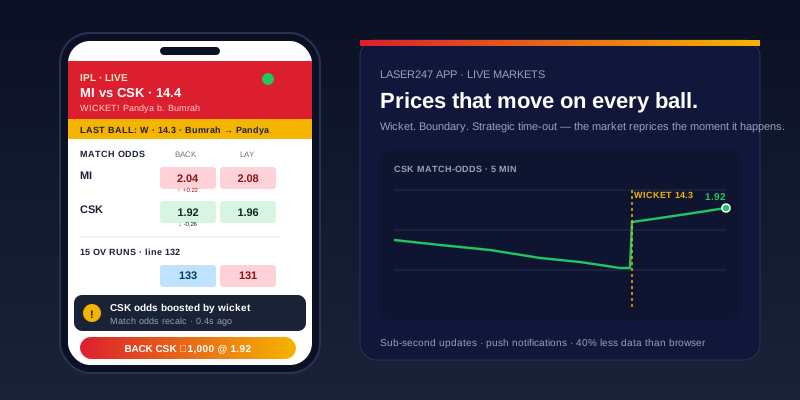
- Persistent data connection. The app holds an open socket to the exchange, so prices refresh the moment they change rather than when you reload a page. On a live cricket market that moves on every ball, the gap between “price changed” and “price visible” is the difference between a fill and a rejection.
- Push notifications. Score alerts, market events, deposit confirmations, withdrawal status updates, and account flags arrive on the home screen even when the app is closed. A browser cannot push notifications without a separate web-push setup that most users never configure.
- Lower data consumption. The app reuses cached assets — fonts, icons, market layouts — instead of downloading them on every page navigation. A heavy live betting session uses a fraction of the data a mobile browser session does.
- Dedicated bet slip. Stake entry, profit and liability preview, and confirmation all sit on a single screen with thumb-sized controls. Browser placement works but adds extra taps.
- Background P&L tracking. Open positions update their running profit and loss in the background. The app’s notification can show the current state without you needing to switch to it.
System Requirements at a Glance
The Laser247 App is light. Most Android phones from the last five years run it without compromise.
| Requirement | Minimum | Recommended |
|---|---|---|
| Android version | 7.0 (Nougat) | 11 or higher |
| RAM | 2 GB | 4 GB |
| Storage (install) | 100 MB | 200 MB+ |
| Storage (running) | 250 MB | 500 MB |
| Connection | 3G | 4G LTE or 5G |
| Screen | 4.7 inch | 6 inch or larger |
The most common cause of poor app performance is not the device specifications — it is a phone running too many background apps on limited RAM. Closing other apps before a live cricket session frees the resources the exchange needs to keep prices updating smoothly.
Why There’s No iOS App (and What iPhone Users Do Instead)
There is no Laser247 App for iPhone. Not because the platform does not support iOS users — Safari and Chrome on iPhone access every feature on the site except biometric login through a native app — but because Apple’s App Store rules effectively block real-money betting apps from the Indian market.
The App Store policy requires gambling apps to be approved per country, with each country requiring a local gaming licence Apple recognises. The Indian regulatory environment is fragmented across states, and a single national licence Apple would accept does not exist. Several Indian betting platforms have tried; none have succeeded in landing a long-term App Store presence. Distributing an iOS app outside the App Store is technically restricted in a way Android’s open-source model is not.
The practical workaround for iPhone users is Safari or Chrome with a saved home screen shortcut. Open the Laser247 homepage, tap Share, and select Add to Home Screen. The shortcut behaves like an app icon, opens in a clean browser window without the address bar, and remembers your login between sessions. The trade-offs are real but limited: no push notifications, no system-level biometric login, and slightly higher data usage than the Android app. The exchange itself, the markets, the deposits, the withdrawals — all work identically on the iPhone browser.
Fix the Most Common Laser247 App Problems
Most app problems trace back to one of five causes. The fixes, in the order you should try them.
“Parse error: There was a problem parsing the package.”
The APK file was either downloaded incompletely or was opened with the wrong Android version. Re-download the file from the WhatsApp thread (do not reuse the old one) and try again. If the parse error persists, your Android version is below 7.0 and the app will not install without an OS upgrade.
The app installs but crashes on launch.
A cached install from a previous version is conflicting with the new one. Uninstall the old version entirely (long-press the icon → app info → Uninstall), restart the phone, and re-install fresh from the WhatsApp thread. Skip the install-over-the-top shortcut — it preserves the broken cache.
Live prices are not updating.
The persistent connection has dropped, usually because Android put the app to sleep in the background. Close the app fully (swipe it off the recent apps list) and reopen. Most modern Android versions also have an aggressive battery-saver mode that closes background sockets — turn battery optimization off for the Laser247 App in Settings → Battery → Battery optimization.
Push notifications stopped arriving.
Three things to check. First, the OS-level notification permission for the app is still on (Settings → Apps → Laser247 → Notifications → Allow). Second, the in-app notification settings are still on. Third, Do Not Disturb is not silently swallowing them. Toggling each off and on usually restores delivery.
Biometric login is not working.
The most likely cause is a recent change to your enrolled biometric on the phone — re-registered fingerprint, new face data, or a factory reset. The app re-binds biometric on the first password-based sign-in after the change; do that once, then biometric will work normally again. The Laser247 Login page covers the binding flow.
The app will not update.
Without Play Store, there is no auto-update. New versions arrive in your WhatsApp thread when they release. If the app shows an update prompt and the WhatsApp thread has not delivered one, ask the agent. Do not download updates from any other source. Any issue not covered above goes through Customer Support on the same WhatsApp thread that delivered the app.
App, Browser, or Both
The honest answer for most users is “both” — the Laser247 App on Android for live cricket and market trading, a browser for everything else.
| Dimension | Laser247 App | Mobile Browser | Desktop Browser |
|---|---|---|---|
| Live market speed | Fastest | Acceptable | Acceptable |
| Biometric login | Yes | No | No |
| Push notifications | Yes | No | No |
| Multi-tab betting | No | Yes | Yes (best) |
| Detailed market view | Limited | Full | Full |
The app wins on live cricket because it keeps the connection open and the screen optimised for one market at a time. The desktop browser wins on pre-match analysis, multi-tournament views, and comparing prices across markets, because the screen is bigger and the workflow supports multiple windows at once. Casual mid-week betting often happens on the mobile browser, simply because the phone is in the user’s pocket and the app does not feel worth opening for a single small position.
Sessions on each device are independent. You can be signed in on app, mobile browser, and desktop at the same time, on the same account, without conflict — the platform treats each device as a separate session and updates the wallet across all of them in real time.
Lock the Laser247 App on a Shared Phone
A betting account on an unlocked phone is a target — for an opportunist roommate as much as for a stranger. The defensive setup if anyone else has occasional access to your phone.
- Set up biometric login in the app, and turn off password fallback at the app level if you trust the biometric reliability of your device. The FIDO Alliance’s passkey and biometric standards underpin how modern Android biometric systems handle this — the biometric is matched on-device, and a successful match unlocks the locally stored credential. Nothing biometric gets sent.
- Enable auto-lock on the app itself, separate from the phone’s lock screen. A short timeout (60 to 120 seconds) means walking away from the phone briefly does not leave the bet slip open to anyone who picks it up.
- Hide notification content on the lock screen. Account-level notifications (deposit confirmations, withdrawal codes) showing up on a phone anyone can glance at is a privacy leak. Settings → Notifications → Laser247 → Lock screen → Hide content.
- Use a separate Android user profile if more than one person regularly uses the device. The Android user system isolates apps and data — the Laser247 App installed on your profile is invisible to other users on the same phone.
- Sign out fully when you stop using the app for the night, not just when you put the phone down. Sessions persist until you actively close them, and a phone left on the bedside table is functionally a logged-in account.
Cricket on the App: Why It Matters at the Boundary
The case for the Laser247 App is strongest on one specific use case: live cricket. Pre-match betting, outright tournament positions, slow markets like Test match draws — all of these work fine in any browser. The app earns its install on the live markets that move with the ball.
A wicket repositions the match-odds market by 20% in two seconds. The app’s open connection updates the price within milliseconds of the event registering. The mobile browser, which has to poll the server on a schedule, sees the same price between half a second and three seconds later. In a market where the price is moving on every ball, that gap is the difference between getting filled at the price you wanted and watching it slip past you.
Session and fancy markets on cricket move even faster than match odds. A boundary in the powerplay shifts the session line, and the line stays at the new level only until the next ball arrives. The app’s notification system also pings you on key events — wicket falls, boundary thresholds, milestone scores — so you can react to a position without watching the match live. The full discussion of the markets themselves sits on the cricket betting page; what the app adds is the speed of acting on them.
FAQ
Is the Laser247 App free to download?
Yes. The app itself, the install, and any updates that arrive through the WhatsApp thread are all free. The only thing that costs money is the wallet you fund inside it.
Why isn’t the Laser247 App on Google Play?
Google Play does not allow real-money betting apps for the Indian market, so no legitimate Indian betting platform appears there. Any app claiming to be Laser247 on Play is not the official build — install only from the WhatsApp thread you used to open your account.
Can I install the Laser247 App on iPhone?
No. Apple’s App Store rules block real-money betting apps for India, so there is no iOS build. iPhone users access the same exchange through Safari or Chrome, with a saved home-screen shortcut for fast launching.
Is the APK safe to install from WhatsApp?
Yes, provided two conditions are met. First, the file is delivered in the same WhatsApp thread you started from the official Laser247 site — not a new chat that contacted you. Second, you install only from that source. Files claiming to be the Laser247 App from any other channel are not the legitimate build.
How much storage does the Laser247 App use?
The install itself is around 100 MB. Running the app uses up to another 150 MB for cached market data, image assets, and offline records. Clearing the app cache periodically (Settings → Apps → Laser247 → Storage → Clear cache) recovers most of the runtime storage without affecting your account.
Is my data faster on the app or the browser?
The app uses less data overall, because cached assets are not re-downloaded on every page view. A heavy live cricket session typically uses 40 to 60 percent less data on the app than the same session on a mobile browser.
Can I use the Laser247 App offline?
Most features need an active connection — betting markets, wallet, withdrawals, and deposits all run live. The app shows your last-known balance and your open position list offline, but new bets and price updates require the connection back.
Will the app drain my battery during live cricket?
The persistent connection and live odds updates consume more battery than a casual app would. A two-hour live cricket session uses roughly 10 to 15 percent of a modern phone’s battery. Battery-optimised mode (Settings → Battery → Laser247 → Optimised) extends that significantly, with a small trade-off in update latency.